
How students submit assignments
How students open an assignment, write their answer, attach files and submit it in myschool.
Students can upload many types of files with their answer, including word-processed documents, spreadsheets, images and even videos.
Steps
-
When students open the Assignment module in myschool, they see their list of assignments with due dates.
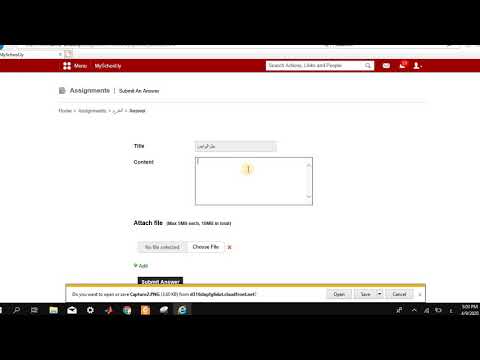
1Video (Arabic): The student assignment list Watch on YouTube -
Clicking an assignment name shows the full assignment description.
Screenshot — to be addedpublic/images/articles/assignment-student-submission-2.png2The assignment description -
Click Answer this assignment to start the submission.
Screenshot — to be addedpublic/images/articles/assignment-student-submission-3.png3The Answer this assignment button -
Enter the answer, attach any required files, and click Submit Answer.
Screenshot — to be addedpublic/images/articles/assignment-student-submission-4.png4The Submit Answer button
Walkthrough
Screenshot — to be added
public/images/articles/assignment-student-submission-5.pngWas this article helpful?
Thanks for your feedback!