
How do I export library data from myschool?
Use Data Export and choose the Book option to export your library's books as CSV or XML.
You can export library data with the Data Export plugin in Data and Reports.
Steps
-
Go to Menu → Data and Reports → Data Export.
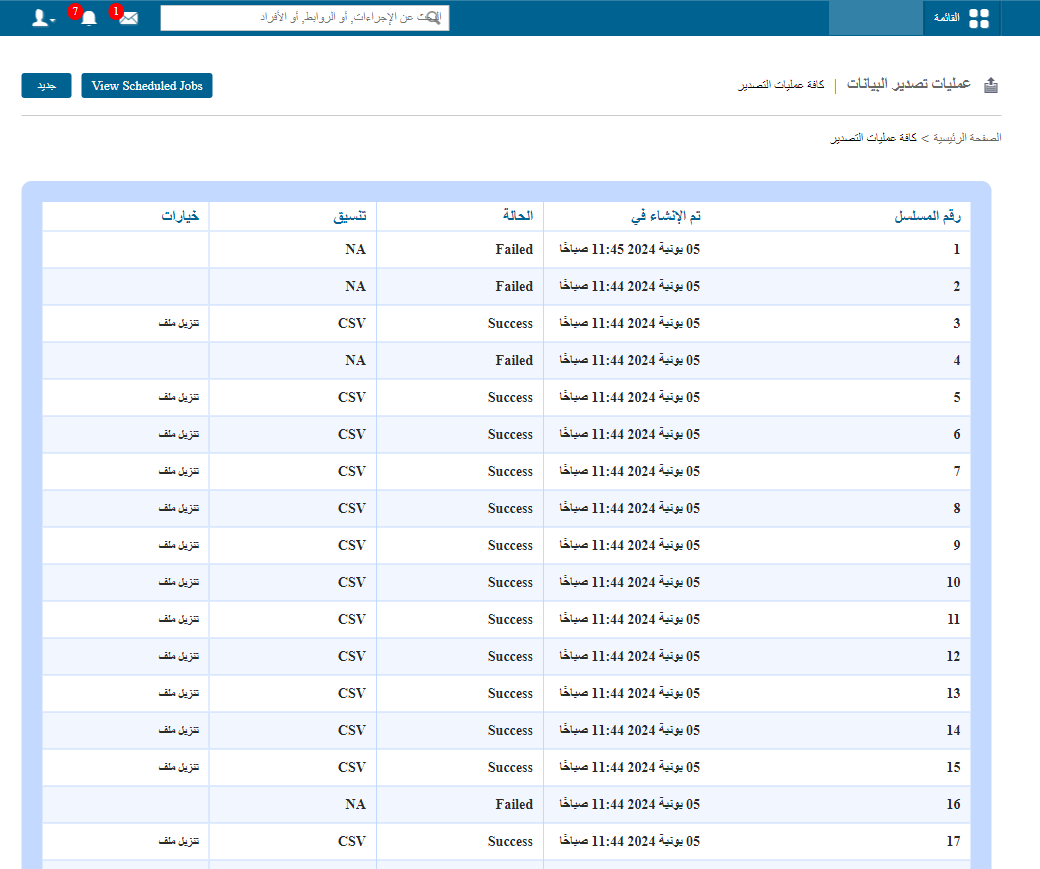
1Data Export home page with the New button -
Click New in the top-right corner to open the export page.
-
Select Book to export the library books.
-
Choose the format: CSV or XML.
-
Schedule the export.
Note: Once you export an option, it becomes available for export again only 30 days after the export date.
Track the export
Open the scheduled jobs page and refresh it until the status changes to Download.
Screenshot — to be added
public/images/articles/faq-data-export-library-data-2.pngDownload the file
When the jobs finish successfully, download the file from the link on the Data Export home page.
Screenshot — to be added
public/images/articles/faq-data-export-library-data-3.pngWas this article helpful?
Thanks for your feedback!