
How to create an attribute profile
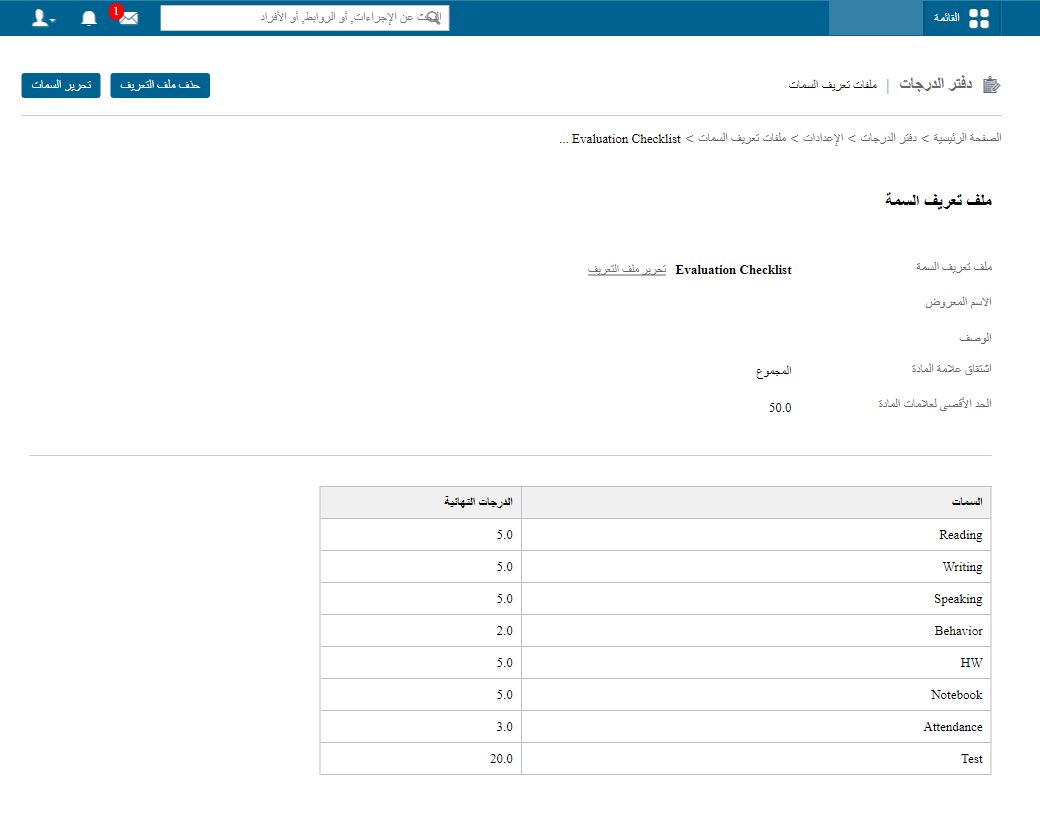
Create attribute profiles so a subject's total mark is calculated from components such as worksheets, class activities and homework.
Attributes are the parameters or skills on which a subject’s mark is calculated. For example, worksheets, class activities and submitted homework can be attributes from which the subject’s total mark is calculated.
The total mark of a subject can be the Sum, Average or Best of its attributes.
You can use the same attribute profile for all subjects or a different attribute profile for each subject. Teachers see these components when entering marks for a subject.
Note: Attributes are not shown in term reports or planner reports; they appear only in exam reports.
Create an attribute profile only if your school splits the total mark this way. If your school does not use such components, you can skip this step.
Steps to create an attribute profile
- Go to Menu → Academics → Gradebook → Settings → Attribute Profiles and click Create Attribute Profile.
- Click Add Attributes and create the attributes, entering the Maximum marks for each.
Example
Was this article helpful?
Thanks for your feedback!