
How to add custom fields for hostel details
Create additional detail fields (text box, select box or check box) to record extra information about each hostel.
You can add custom fields to record any additional hostel information your institution needs.
Steps
Go to Menu → Administration → Hostel → Manage hostel additional details.
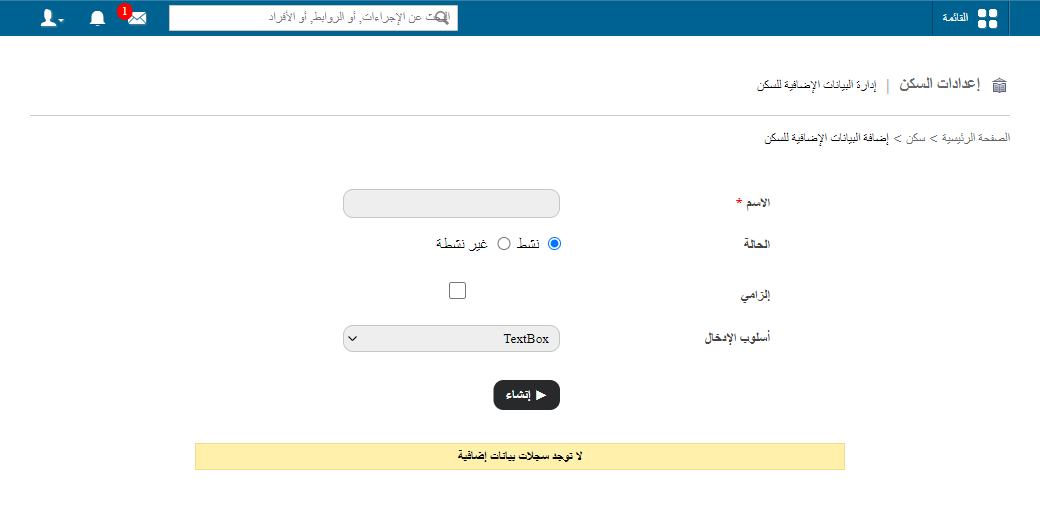
- In the Name field, enter the name of the custom field. This name is shown when recording hostel details.
- Select the field Status:
- Active: the field is available when recording hostel details.
- Inactive: the field is not available when recording hostel details. You can change the status at any time.
- Select the Is mandatory check box if the field must be filled in when recording hostel details.
- Select the input method:
- Select Box: choose one option from a drop-down list.
- Check Box: choose one or more options.
- Text Box: enter a short text.
- Click Create.
- Use the arrow icons to set the order in which the fields appear when recording hostel details.
Screenshot — to be added
public/images/articles/hostel-additional-detail-fields-2.pngRelated articles
Was this article helpful?
Thanks for your feedback!