
Notification management
Control which in-app notifications each module sends to students, parents and employees, on the web and in the mobile app.
The Notification Control Settings give you full control over internal notifications in myschool. Administrators and privileged employees can choose which notifications each module sends to students, parents/guardians and employees/admins. All notifications are enabled by default, and you can change them to suit your needs.
Configure notifications on the web
- Go to Menu → Administration → Settings → Notification Control Settings.
- For each module, select the notification actions that each user group should receive.
- Click Save Settings.
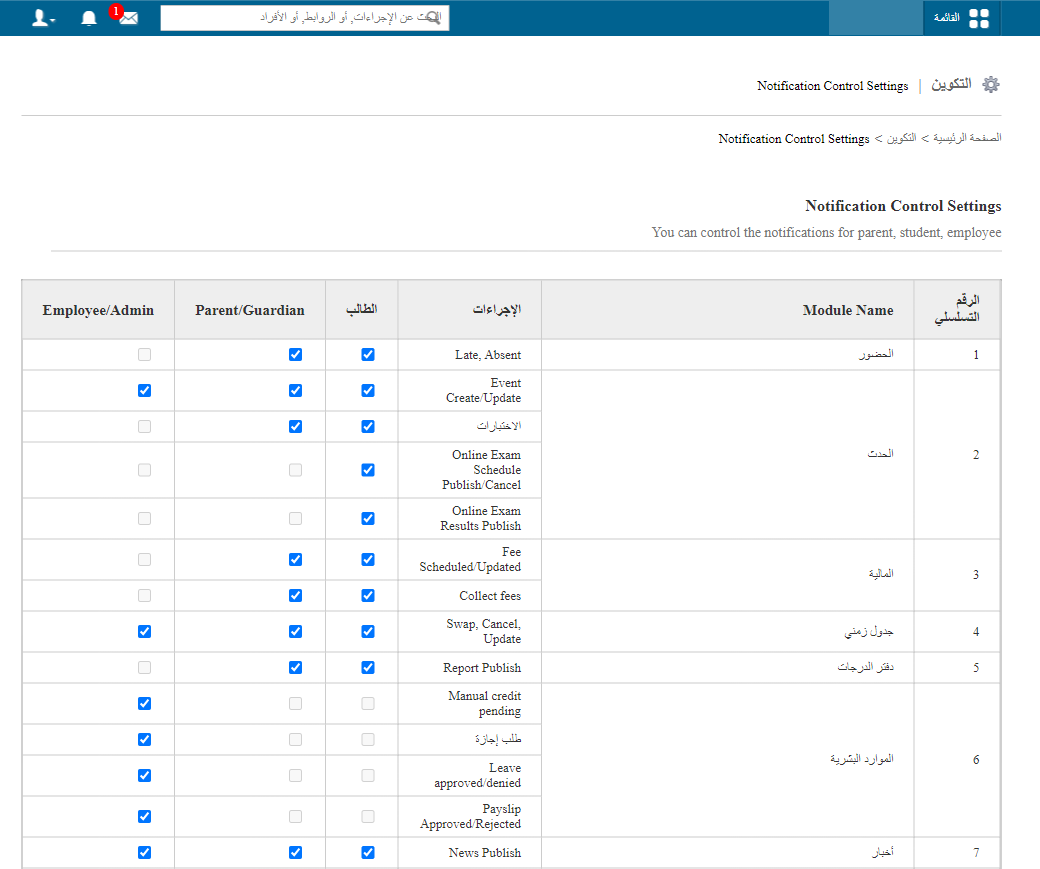
Notification settings in the mobile app
Users can also personalise, in the mobile app, which notifications they receive and see in the phone’s notification bar.
-
Tap the ≡ menu in the top-left corner of the app.
Screenshot — to be addedpublic/images/articles/notification-management-2.png2Menu icon in the mobile app -
Tap Notification Settings to see the options available for your user type.
Screenshot — to be addedpublic/images/articles/notification-management-3.png3Notification Settings option in the mobile app -
Turn notifications on or off for the features you want.
Screenshot — to be addedpublic/images/articles/notification-management-4.png4Notification controls in the mobile app
Was this article helpful?
Thanks for your feedback!