
How to add a new vehicle
Add a vehicle with its registration number, type, model, GPS number, seat count and status.
Steps
-
Go to Menu → Administration → Transport → Vehicles to open the Vehicle Details page.
-
Click Add Vehicle in the top right.
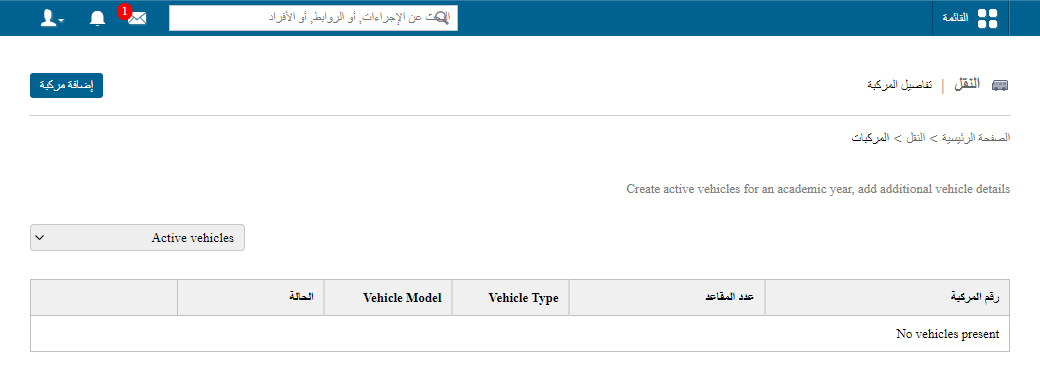
1The Add Vehicle button -
In Vehicle Number, enter the vehicle’s registration number.
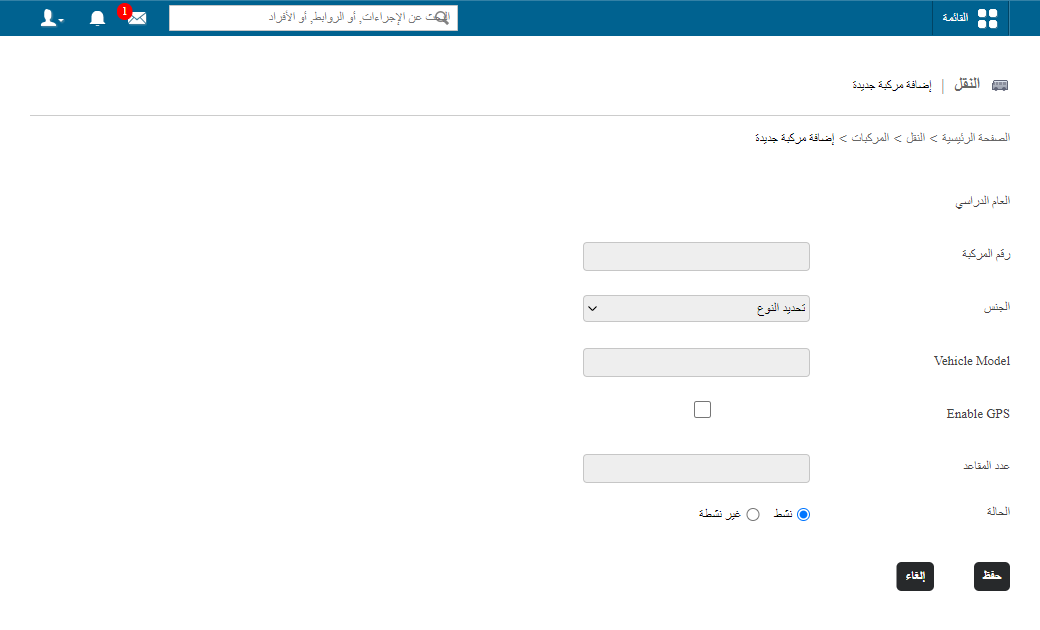
2Entering the vehicle number -
In Type, select the vehicle type: Own, Leased or Vendor.
-
In Vehicle Model, enter the model of the vehicle.
-
In GPS number, enter the GPS number allocated to the vehicle.
-
In No. of seats, enter the total number of seats in the vehicle.
-
Set the vehicle status:
- Active – in service.
- Inactive – not in service.
-
Fill in any additional fields.
-
Click Save.
Screenshot — to be added
public/images/articles/transport-add-vehicle-3.pngWas this article helpful?
Thanks for your feedback!